Camp menu app · CNRL Albian Village · menu from ESS
Albian Village camp menu app: this week's menu on your phone
The Albian Village camp menu app is this site's weekly menu page saved to your phone's home screen, so it opens full-screen like any other app. It is free, with no app store, no account and no sign-up.
Albian Village dinners, week of November 8
- Sun 8Roast Beef · Chili Lime Roasted Chicken
- Mon 9Tropical Pineapple BBQ Chicken · Cajun Cod & Tomatoes
- Tue 10Ginger and Honey Baked Pork · Peach and Apricot Glaze
- Wed 11Sirloin Steak · Chicken Breast with Pineapple Teriyaki Glaze
- Thu 12Sweet Chili Roasted Chicken · Thai Chicken & Mushroom Stir Fry
- Fri 13Chicken Mole · Breaded Cod
- Sat 14Lemon Dill Halibut · Barbacoa Beef with Potatoes
Key facts
- Cost
- Free, no account
- Get it from
- This page, not an app store
- Camp
- CNRL Albian Village
- Menu published by
- ESS (Eurest)
- Opens to
- This week's menu
- Without signal
- Shows the last menu your phone loaded
What does the camp menu app do?
Everything below is on the menu page today.
- This week's menu for Albian Village, by day and by meal: Breakfast, Lunchroom and Dinner, plus the salad bar.
- Tonight's dinner card at the top. It picks the meal for the time of day on your phone and marks today. Tap a day or a meal, step through the week meal by meal with the arrows, or tap "Next meal" to see what's coming.
- Search for a dish, with quick chips for Bacon, Chicken, Beef, Fish, Pasta, Soup.
- No pork, Meat-free and Vegan only views. They read the dish name only, because ESS does not print allergen or halal labels, so ask the kitchen if it matters to you.
- Like or hide dishes. Tap a dish, then Like or Hide it (one tap; Undo if you slip). Hidden dishes stay hidden on later menus too. They are saved in the browser on that phone. On an iPhone the home-screen app keeps its own separate storage, so likes you made in Safari will not show up in the home-screen app, and the other way round.
- Past weeks' menus, archived and dated.
- Keeps working when camp WiFi drops. It shows the last menu your phone loaded (details below).
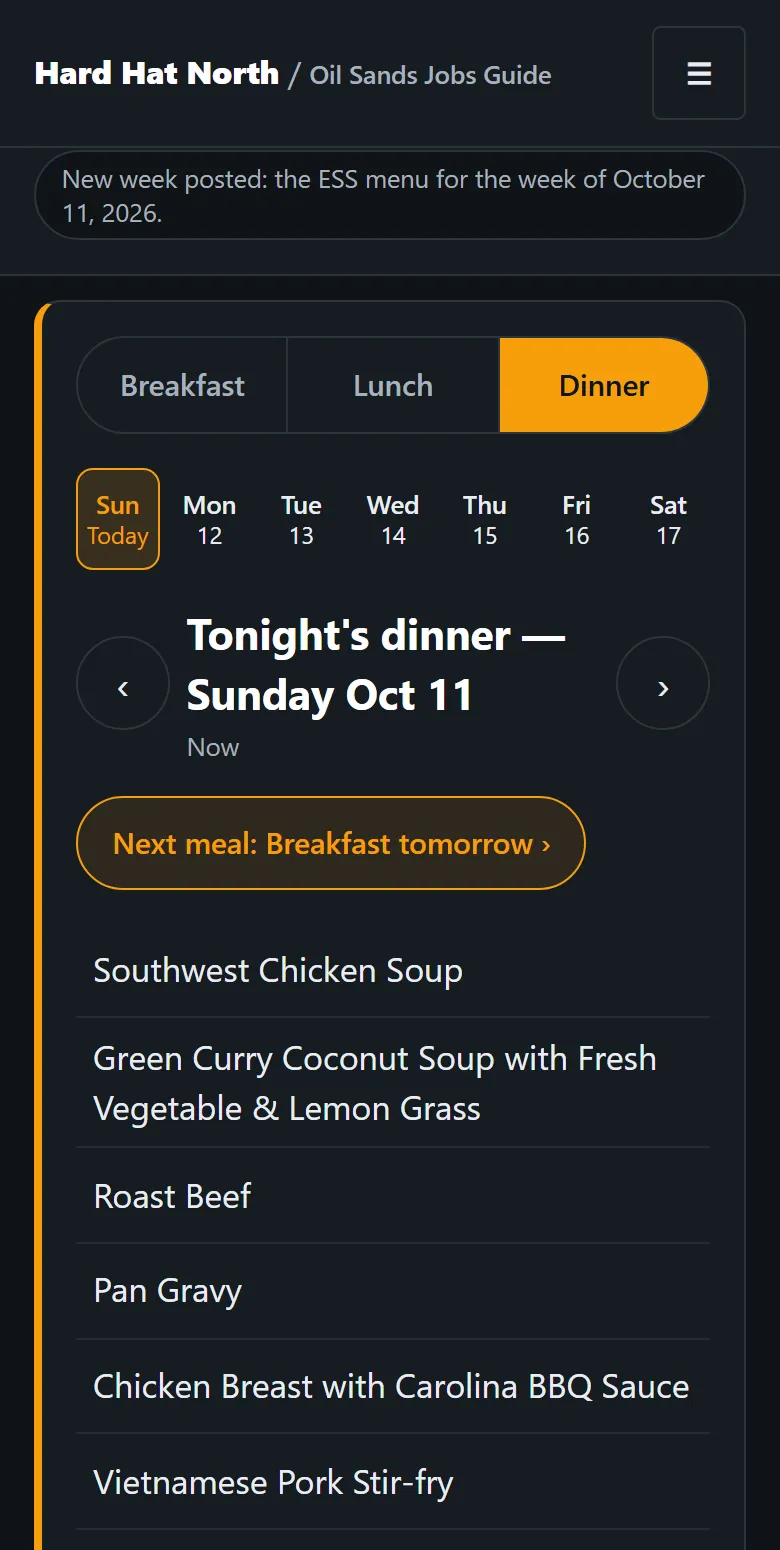
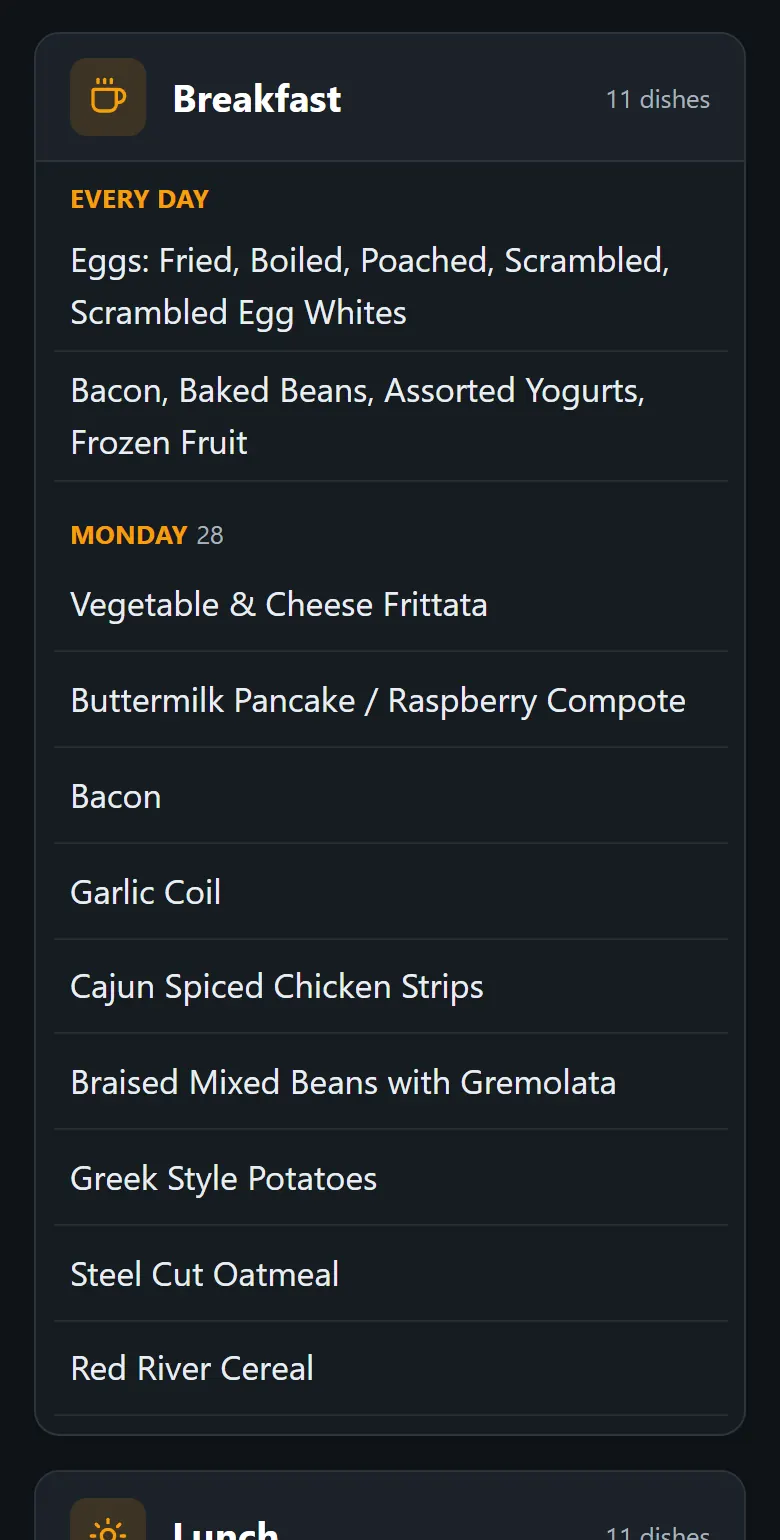
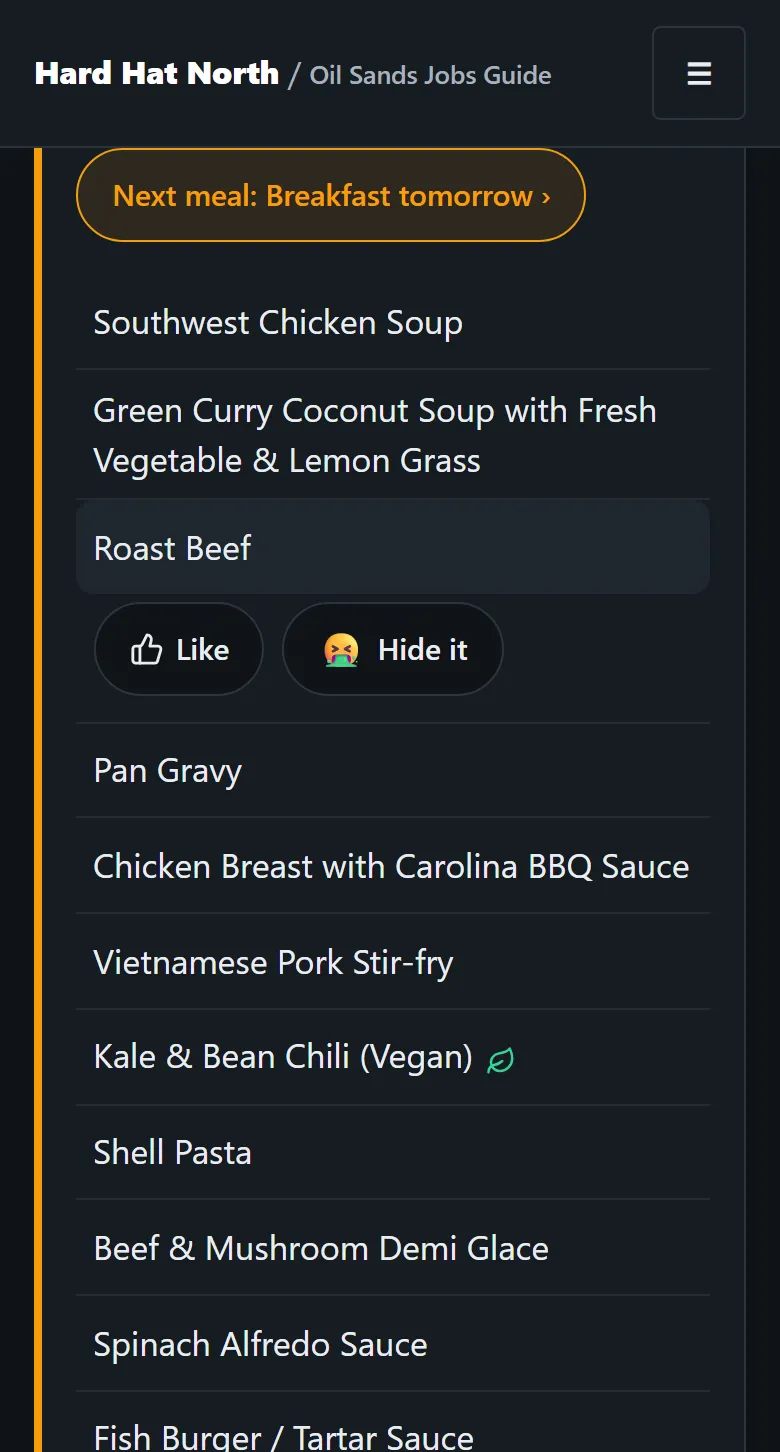
Screenshots of the menu page: the list from the week of September 27, 2026; the other two from the week of October 11, 2026.
How do I add the camp menu to my home screen?
Use the button below if your phone shows it. If not, follow the steps for your phone. Once it is on your home screen, tapping the icon opens the menu page directly, not the site's front page.

Oil Sands Guide
This week's camp menu, one tap away -- works when camp WiFi drops.
Camp menu app
Put the menu on your home screen
Takes about 10 seconds. Free, nothing to sign up for.
iPhone and iPad (Safari, or any browser on iOS)
- Tap "•••" next to the web address, then tap Share. (Older iPhones: tap the Share button on the bottom bar.)
- Scroll down and tap "Add to Home Screen".
- Tap "Add" in the top corner. The menu now sits on your home screen like any other app.
Chrome, Brave and Firefox on an iPhone use the same Share list (iOS 16.4 and later). No "Add to Home Screen" in it? Open this page in Safari and try again.
Android: Chrome
- Open the menu (⋮) in the top right.
- Look for "Install app" or "Add to Home screen" and tap it — Chrome is partway through renaming this, so either wording means the same thing.
Android: Samsung Internet
- If a "+" icon shows in the address bar, tap it, then tap "Home screen".
- Otherwise, open the menu, then look for "Add page to" → "Home screen".
Android: Brave
- Open the menu (⋮) in the top right.
- Look for "Add to Home screen" or "Install app" and tap it.
- If neither shows up, reload the page first — Brave sometimes takes a moment to recognize a page as installable.
Android: Edge
- Open the menu (⋯) next to the address bar.
- Look for "Add to phone", "Install app", or "Apps" → "Install this site as an app" and tap it.
Android: Firefox
- Open the menu (⋮) in the top right and look for "Install" or "Add to Home screen".
- If neither is there, touch and hold the address bar and use "Add Page Shortcut" instead — it opens in a browser tab rather than full-screen, but it’s still one tap from your home screen.
On a computer (Chrome, Edge, Brave)
- Look for an install icon at the right end of the address bar (a small monitor or a "+").
- If you don’t see it, open the browser menu and look for "Install page as app", "Install this site as an app", or "Apps".
On a computer (Firefox)
- Bookmark this page (Ctrl/Cmd+D) or pin the tab so it's one click away.
Firefox on a computer has no built-in "install as app" option, so a bookmark or pinned tab is the closest thing.
On any other browser, open its menu and look for “Add to Home screen” or “Install”.
What is a PWA?
PWA stands for progressive web app. In plain words, it is a website you can save to your home screen so it opens like an app, without going through the App Store or Google Play. The camp menu app is one of these. It is still this website underneath, so there is nothing big to download and no update to install by hand.
Does the camp menu app work without internet?
Yes, for the menu your phone has already loaded. This is how it works:
- Your phone saves a copy of the menu page and the past weeks page, and it keeps a copy of other pages as you open them.
- It always tries the internet first, so with signal you get the newest menu.
- If the connection fails, it shows the saved copy instead. Tonight's dinner still works out today's day and meal on the phone, so it does not show yesterday's meal.
- If your phone has never loaded the menu and there is no signal, you get a short offline page, not the menu.
A saved copy is only as new as the last time your phone had signal. If ESS has posted a new week since then, you will not see it until you are back online.
What the camp menu app is not
- It shows the menu ESS (Eurest) publishes for CNRL Albian Village. It is not the menu for Wapasu or any other camp.
- It is not affiliated with ESS, Eurest, Compass Group or CNRL. It is an independent page that reads their published menu into a form that is easier to use on a phone.
- The menu updates when ESS posts a new week, and this site is updated after that, so a new week can show up a little late.
- Menus change without notice. The board or screen in your camp is what counts.
- It does not predict future menus. There is nothing to show for a week ESS has not posted.
Want to see how the menu itself is put together, what repeats and where it comes from? Read the full Albian Village camp menu page.
Camp menu app questions
Is there an app for the camp menu?
Yes, but it is not an app-store app. It is this site's Albian Village menu page, saved to your phone's home screen so it opens full-screen like an app. It costs nothing and there is nothing to sign up for.
What is a PWA?
PWA stands for progressive web app. It is a website that can be saved to your home screen and opens like an app, without going through the App Store or Google Play. It is still the website underneath, so it stays up to date on its own whenever you have signal.
Does the camp menu app work without internet?
The menu does, once your phone has loaded it. Your phone keeps a copy of the menu page and the past weeks page, and of any other page you have opened. When the connection drops it shows that copy, and Tonight's dinner still works out today's day and meal on the phone. With signal it always tries for the newest menu first. If the phone has never loaded the menu and has no signal, you get a short offline page instead.
Is it free? Do I need an account?
It is free and there is no account. The app never asks for your name, email or phone number.
Is it on the App Store or Google Play?
No. It does not need to be. Saving it to your home screen takes a few taps, there is no store download to wait for, and it has no separate update to install. The steps for each phone are further up this page.
How do I remove the camp menu app?
Remove it the way you remove any home-screen icon. On an iPhone, touch and hold the icon and choose Remove App, then Delete App. On Android, touch and hold the icon and choose Uninstall or Remove. Your dish likes and hides are saved in the browser, so clearing this site's data in your browser settings wipes them too.
Which camp is this menu for?
CNRL Albian Village only. It is the weekly menu that ESS (Eurest) publishes for that camp, shown in a form that is easier to read on a phone. It is not the menu for Wapasu or any other camp, and it changes when ESS posts a new week.
Does the app track me?
There is no account and no advertising tracking. Like most websites, this one keeps anonymous visit statistics: which pages get opened, how far people scroll and what they tap, plus replays of visits while the site is new, with anything you type into a box hidden. Your list of liked and hidden dishes is kept on your phone, and each like or hide tap is also counted anonymously (just the dish name and meal) so we can see what workers want to eat. The full list of what is recorded is on the privacy page.